

CCTVPLANNER.IO · DESIGN TOOL · v1.10.19
Free Security Camera Design Tool
Plan professional surveillance systems online. Visualize camera coverage, calculate field of view, design layouts on satellite maps, and export PDF reports — all for free.
BUILT FOR · THREE ROLES
Built for Security Professionals
CCTV Installers
Design accurate camera layouts before installation. Visualize coverage, eliminate blind spots, and present professional proposals to clients.
System Integrators
Standardize your design workflow across projects. Save time with reusable templates and a database of 65,000+ real camera models.
Security Consultants
Create detailed surveillance plans with precise coverage analysis. Export professional reports for client presentations and audits.
KEY FEATURES · FOUR TOOLS
Key Features
Field of View Visualization
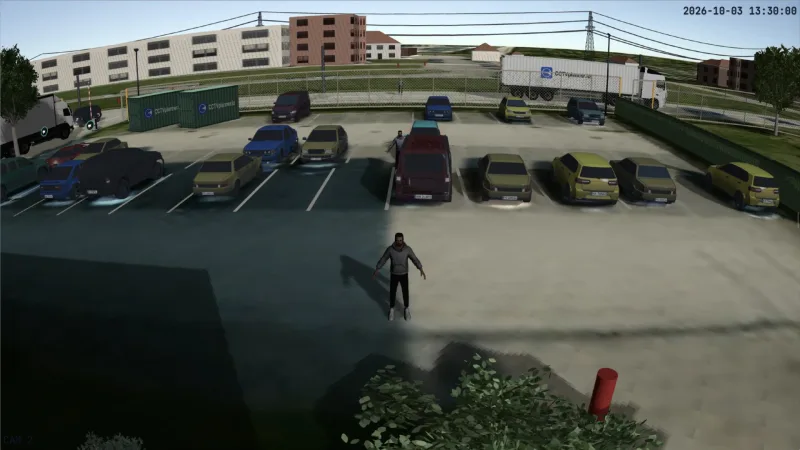
See exactly what each camera covers in real-time. Adjust lens, angle, and mounting height to optimize coverage and eliminate blind spots.
Satellite Maps & Floor Plans
Design on Google Maps satellite imagery for outdoor sites, or upload floor plans for indoor installations. Work on accurate, real-world layouts.
65,000+ Real Camera Models
Choose from a database of real cameras from Hikvision, Dahua, Axis, and more — with accurate lens, resolution, and range specifications.
Coverage Analysis
Identify blind spots and overlapping coverage areas instantly. Verify your design meets DORI requirements before installation.
WHAT IT CALCULATES · SIX RESULTS
Everything the design needs, computed per camera.
DORI and pixel density
Detect, Observe, Recognise and Identify zones to EN 62676-4, drawn from each camera's sensor and lens, so you know what every camera will identify.
NO.02Lens selection
65,943 camera models from 307 manufacturers with real sensor and focal length data. Pick the lens that reaches the distance you need.
NO.03Storage and bandwidth
Recording storage and network bandwidth for every camera, from its resolution, codec, frame rate and retention time.
NO.04PoE budget
The power the cameras draw against the PoE budget of the switches and recorders you place, so the site does not run short of power.
NO.05Cable routes and lengths
Draw cable routes on the plan and get the length of every run in the cable schedule.
NO.06Design validation
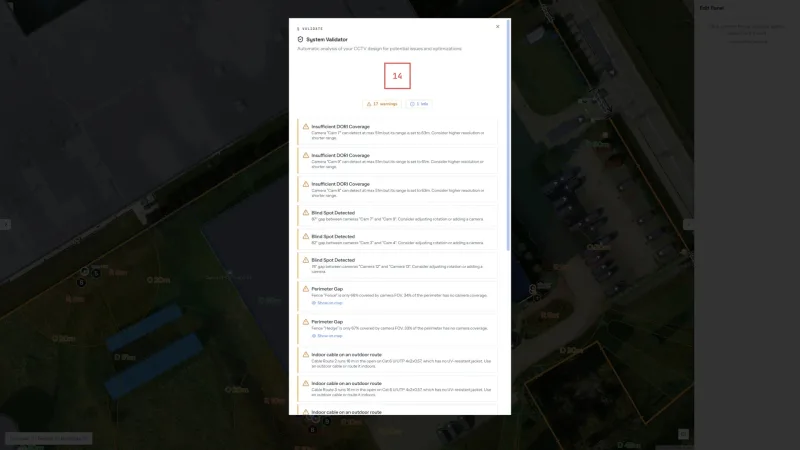
67 automatic checks flag blind spots, DORI shortfalls and power or cabling problems before installation.
HOW IT WORKS · SIX STEPS
How to design a security camera system.
- 01
Open the site
Find the address on the satellite map or upload a floor plan. Buildings and terrain come with the map.
- 02
Place the cameras
Put cameras where coverage is needed and pick each model from the catalogue.
- 03
Aim and set the lens
Set the mounting height, tilt and focal length. The coverage updates as you change them.
- 04
Check the coverage
Review the DORI zones, the blind spots and the view from each camera.
- 05
Add the infrastructure
Place recorders and switches, draw the cable routes, then check storage and PoE.
- 06
Export and send
Export the PDF report, the bill of materials and the quote, and share them with the client.
WHY CCTVPLANNER · FOUR REASONS
Why CCTVplanner?
Free Forever
Permanent free plan with no time limit
No Download
Works in your browser — PC, Mac, tablet
Multi-Vendor
65,000+ cameras from all major brands
33 Languages
Available in 33 languages worldwide
RELATED RESOURCES · FOUR GUIDES
Dig deeper with our guides.
QUESTIONS · FOUR ANSWERS
Questions about security camera design tools.
What is a security camera design tool?
A security camera design tool is software that helps plan and design surveillance camera systems before installation. It allows you to place cameras on maps, visualize their coverage area, calculate field of view, identify blind spots, and generate professional reports for clients.
How do I design a security camera system?
Use CCTVplanner's security camera design tool: 1) Find your location on Google Maps or upload a floor plan, 2) Place cameras where you need coverage, 3) Adjust lens and mounting parameters to optimize field of view, 4) Check for blind spots, 5) Export your design as a professional PDF report.
Is there a free security camera design tool?
Yes. CCTVplanner is a free security camera design tool that lets you plan surveillance systems with up to 6 cameras per project, permanently free, no credit card required. Paid plans unlock unlimited cameras and advanced features.
What's the difference between CCTV design tool and security camera design tool?
They are the same type of tool. 'CCTV design tool' and 'security camera design tool' both refer to software for planning surveillance camera placement and coverage. CCTVplanner works for both traditional CCTV and modern IP camera systems.
Start Designing Your Security Camera System
No credit card required. Design your first surveillance layout in minutes with our free security camera design tool.
Also explore: CCTV Design Tool · Camera Placement Tool · CCTV Layout Software · CCTV Design Guide