

CCTVPLANNER.IO · CALCULATOR · DORI
DORI Calculator
Detect, Observe, Recognize, Identify — calculate the distance at which your camera meets each EN 62676-4 threshold.
✓ This calculator is free to use - No credit card required
1080p Full HD (2MP)
Computed HFOV
68.0°
DORI Distances
Detect · 25 PPM
56.9m
Notice that a person is present
Observe · 63 PPM
22.6m
Characterise gender, clothing, action
Recognize · 125 PPM
11.4m
Match a person you have seen before
Identify · 250 PPM
5.7m
Reliably identify a stranger / read a plate
With a 1080p camera on a 1/2.8" sensor and a 4.0 mm lens, you can identify a person up to 5.7 m away (250 PPM threshold). Beyond that you fall to recognition only — useful for "did someone enter the area" but not for legally usable identification.
What is DORI in CCTV?
DORI stands for Detection, Observation, Recognition, Identification — four surveillance tasks defined in the European standard EN 62676-4. Each task requires a minimum pixel density on the target, expressed in pixels per metre (PPM).
- Detection (25 PPM) — you can tell something or someone is there. Useful for motion-triggered alerts and general awareness.
- Observation (63 PPM) — you can characterise actions, gender, and clothing colour. Good for behavioural analysis.
- Recognition (125 PPM) — you can match the subject to someone you have seen before (family member, employee, regular customer).
- Identification (250 PPM) — you can reliably identify a stranger or read a European license plate. This is the threshold most courts and insurers accept as evidentiary.
Two cameras with the same field of view can deliver very different DORI distances depending on resolution and sensor size. A 4K camera on a 1/2" sensor with an 8 mm lens reaches identification much further than a 1080p camera on the same sensor with a 4 mm lens — even though both might be marketed as "for parking lot use".
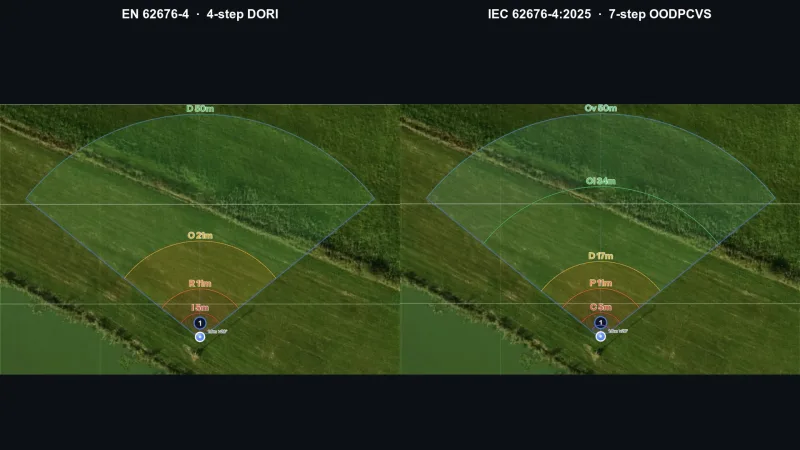
EN 62676-4 and the IEC 62676-4:2025 OODPCVS update
EN 62676-4 is the European Application Guideline for Video Surveillance Systems and the only widely-adopted standard that defines surveillance performance in physically measurable terms — pixels per metre on the target — instead of marketing terms like "HD" or "4K". The standard was published by CENELEC in 2014, replacing the older British BS EN 50132-7 specification, and it remains the de-facto reference for tender documents, evidentiary acceptance, and insurance compliance across the EU, UK, Australia, and most Commonwealth jurisdictions.
Why pixels per metre and not megapixels? Because the same 4K camera can yield 1000 PPM on a person 1 m from the lens or 30 PPM on a person 50 m away — the megapixel count is fixed, but the on-target pixel density depends on focal length, sensor width, and distance. A specification that ignores those three variables tells you nothing useful about evidentiary value. EN 62676-4 normalises everything into a single number: how many camera pixels actually land on one metre of the scene at the target plane.
The four DORI thresholds were calibrated against decades of human-factors research, originally derived from the Johnson Criteria (NATO STANAG 4347) used for thermal sensors, then adapted to visible-light pixelated imagery. 25 PPM is enough to tell that a person-sized object is present; 63 PPM lets a trained operator describe gender and clothing colour; 125 PPM allows a familiar face to be matched; 250 PPM enables forensic identification of a stranger and reading of European-format licence plates. Each threshold is a statistical floor, not a guarantee — lighting, contrast, motion blur, codec artefacts, and operator training all interact with the raw pixel count.
IEC 62676-4:2025 — published in 2025 — adds OODPCVS, a parallel seven-step pixel-density ladder that runs alongside the four classic DORI thresholds. The new steps are Overview (20 px/m), Outline (40), Discern (80), Perceive (125), Characterise (250), Validate (500) and Scrutinise (1500). The four DORI numbers are unchanged, so any design specified in DORI remains valid; OODPCVS simply gives procurement teams finer-grained targets, including three new tiers below Detect for wide-area awareness and two new tiers above Identify (Validate at 500 px/m for facial verification and Scrutinise at 1500 px/m for passport-grade biometric capture). CCTVplanner exposes both ladders — pick the camera, switch between DORI and OODPCVS with a single toggle.
The math behind the calculator above is straightforward but worth understanding. For a sensor of width W (millimetres) paired with a lens of focal length f (millimetres), the horizontal angular field of view is HFOV = 2 × arctan(W / 2f). At a target distance D (metres), the scene width visible across the full sensor is 2 × D × tan(HFOV / 2). Divide the camera horizontal pixel count H by that scene width and you have the pixel density at distance D. Setting that equal to the required PPM and solving for D gives the formula used here: D = H / (2 × PPM × tan(HFOV / 2)). Sensor height and aspect ratio do not enter the horizontal calculation, but they matter the moment you tilt the camera or rotate it for corridor coverage.
How to use this DORI calculator
- Pick your camera resolution. This is the horizontal pixel count of the sensor — 1920 for 1080p, 2560 for 4 MP, 3840 for 4K. If your camera is sold as "5 MP 2592×1944", the relevant figure is 2592. Do not use the cropped or digitally-zoomed resolution; the calculator needs the native sensor read-out.
- Select the sensor size. Most fixed-lens bullets and turrets ship with a 1/2.8" sensor (5.4 mm wide). Higher-end PTZs and box cameras may use 1/2", 2/3", or 1" sensors. The figure is almost always in the spec sheet — if not, the manufacturer's product page lists it under "Image sensor".
- Set the focal length. Use the slider for any value between 1 and 50 mm, or click one of the popular presets. For varifocal lenses, run the calculation at both ends of the zoom range to see the worst-case and best-case DORI distances.
- Read the four output cards. Each card tells you the maximum distance at which the camera meets that DORI threshold. Identify (250 PPM) is always the shortest range — that is the absolute limit for evidentiary face capture. Detect (25 PPM) is always the furthest, but only useful for "is someone there" alerts.
Worked example: warehouse loading dock
A 3PL operator wants to install a camera over a 25 m long loading dock. The brief from their insurer is straightforward: every truck driver and forklift operator must be identifiable on playback, and any pallet movement at the far end of the dock must at least be observable so that incident reviews can attribute losses to the right shift.
The integrator quotes a 4 MP fixed-lens bullet: 2560 horizontal pixels, 1/2.8" sensor (5.4 mm wide), and a 4 mm lens. Plugging those numbers into the calculator above yields HFOV = 68.6°, with DORI distances of approximately 84 m for Detect, 33 m for Observe, 17 m for Recognize, and 8 m for Identify. The first problem is immediate: at 25 m — the far end of the dock — the camera only delivers about 41 PPM, which is below the 63 PPM Observe threshold. Pallet movement at the far bay would be visible but not characterisable.
The fix is to swap the 4 mm fixed lens for an 8 mm lens (or a 2.8–12 mm varifocal locked at 8 mm). Re-running the math: HFOV drops to 37.4°, and the Identify distance jumps to about 16 m, Recognize to 33 m, and Observe to 67 m. The 25 m far-bay target now sits comfortably above the Recognize threshold (around 84 PPM) and well above the Observe floor. The trade-off is the narrower coverage: the 8 mm lens covers only 17 m wide at 25 m distance, versus 34 m for the 4 mm lens. If the dock is wider than 17 m, the integrator either deploys two 8 mm cameras side by side or accepts the 4 mm coverage and downgrades the spec from "identifiable driver" to "observable activity, with a separate dedicated identification camera at the entry gate".
This kind of trade-off is exactly what EN 62676-4 forces you to make explicit at the design stage rather than discover after install. A loading-dock spec written as "4 MP camera with 4 mm lens for full coverage" sounds reasonable until the insurer asks for the DORI table — at which point the gap between marketing copy and physics becomes a contractual problem.
Common mistakes integrators make
- Confusing pixel-on-target with PPM. A 1080p camera might give "200 pixels on a face" at 5 m, which sounds great — but face width is roughly 0.16 m, so that is only about 1250 PPM-equivalent on the face plane, not on a one-metre slice of the scene. The PPM metric is per metre of horizontal scene, not per object. Always normalise to scene metres before comparing cameras.
- Using the wrong sensor width. A "1/2.8 inch" sensor is not 1/2.8 inches wide — the legacy nomenclature dates from vidicon tubes and is roughly 5.4 mm in modern CMOS. A "1/3 inch" sensor is 4.8 mm. Using the literal inch fraction in the calculator overestimates HFOV by about 50% and crushes every DORI distance accordingly. Always look up the actual mm width or rely on the presets in this calculator.
- Forgetting the tilt correction. A camera mounted at 4 m and aimed at the ground 10 m away does not have a 10 m line-of-sight to the subject — the slant range is closer to 10.8 m, and the target appears foreshortened. The pure horizontal DORI math holds at the optical axis only. For tilted installs, always use the slant range, and note that the floor-projected DORI footprint is an elongated trapezoid, not a clean rectangle.
- Quoting Identify range without lighting analysis. EN 62676-4 PPM thresholds assume sufficient illumination, focus, and motion freeze. A camera that delivers 250 PPM at 8 m on paper will not produce identifiable footage at 8 m if the scene is at 0.5 lux and the shutter is at 1/15 s. Always pair DORI math with a low-light scenario test and codec-noise budget.
- Ignoring aspect ratio for vertical targets. Standing humans are roughly 1.7 m tall and 0.5 m wide. A camera aimed at a corridor cares more about vertical pixel density than horizontal. Either rotate the sensor (corridor mode) or compute PPM on the short axis explicitly — the IEC 62676-4:2025 update calls this PPM_v.
Standards and compliance references
- EN 62676-4:2015 — Video surveillance systems for use in security applications, Part 4: Application guidelines. The original DORI standard, harmonised across CENELEC member states. EN 62676-4 calculator →
- IEC 62676-4:2025 (OODPCVS) — The 2025 international update that adds Monitor sub-tier, AI-analytics guidance, and corridor-mode PPM_v. Backwards-compatible with the 2015 thresholds.
- NATO STANAG 4347 / Johnson Criteria — Cycles-on-target metric for thermal and mid-wave IR sensors (1.5 cycles Detect, 6 Recognize, 12 Identify). Used when DORI does not apply because the target is heat-imaged rather than pixelated visible light. Johnson Criteria calculator →
- NDAA Section 889 — US National Defense Authorization Act prohibition on covered telecom and video equipment from listed manufacturers. Independent of DORI, but often a tender prerequisite alongside it. NDAA compliance reference →
- UK Surveillance Camera Code of Practice — Issued under the Protection of Freedoms Act 2012; references EN 62676-4 PPM thresholds for "operationally requirements-compliant" deployments.
Continue reading
Related Articles
How focal length and sensor size determine FOV
Why PPM matters more than megapixels
EN 62676-4 in installer practice
Design the full system, not just the lens.
CCTVplanner places cameras on satellite maps and floor plans, validates DORI zones automatically, and exports compliance-ready PDFs — for free.